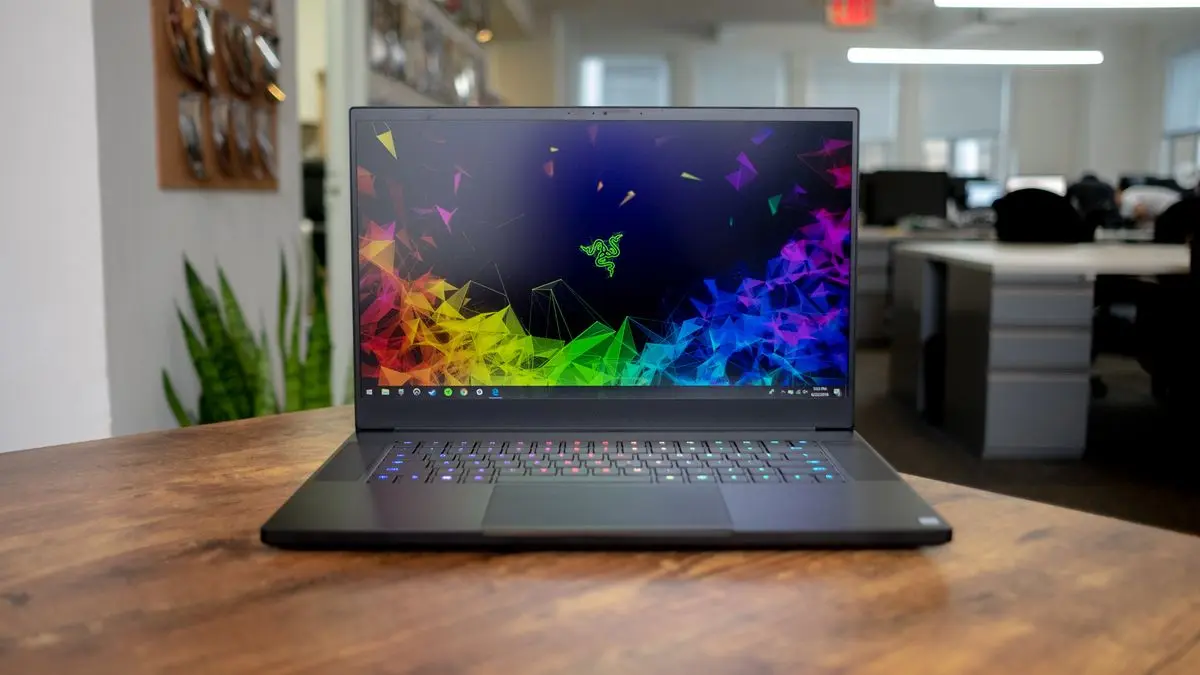

The Razer Blade 15 (2018 H2) marked a turning point in the gaming-laptop market. Prior to its release, finding a laptop that combined thin-and-light design with uncompromising performance was difficult. Razer changed the narrative by offering desktop-class power inside a premium aluminum chassis measuring only 0.66 inches thick. Even years later, the 2018 H2 edition is still remembered as one of Razer’s most influential models.
Premium Build and Portability
The design of the Razer Blade 15 (2018 H2) immediately grabs attention. The chassis is built from CNC-milled aluminum coated with a matte finish that resists fingerprints fairly well for a dark laptop. The iconic green triple-snake logo on the lid adds an aggressive gaming aesthetic without being over the top.
Despite significant power under the hood, the laptop weighs around 4.6 pounds (2.07 kg) and has a footprint similar to many 15-inch ultrabooks of the time. For gamers and creators who travel frequently, this combination of lightness and power was groundbreaking. The compact GaN-style power brick made the package even more travel-friendly.
Display Options That Elevated Gaming
The Razer Blade 15 (2018 H2) was offered with two main display configurations:
| Resolution | Refresh Rate | Panel Type | Notes |
|---|---|---|---|
| 1080p | 144 Hz | Matte IPS | Ideal for esports and high-FPS gaming |
| 4K | 60 Hz | Glossy IPS (Touch) | Ideal for creators and media professionals |
The 144 Hz 1080p model was especially popular among competitive gamers. With GPU performance capable of pushing 100+ FPS in many titles of the era, the rise of high-refresh displays truly transformed the experience. Colors were rich, response time was fast, and viewing angles were excellent.
The 4K touch model catered more toward video editors, 3D artists, and photographers who valued resolution and color accuracy over refresh rate. With full sRGB coverage and good AdobeRGB reproduction, it served as a capable workstation screen.
Hardware and Performance
The Razer Blade 15 (2018 H2) was powered by the Intel Core i7-8750H, one of the most influential laptop processors of its time. With six cores and 12 threads, it delivered a dramatic leap in productivity performance compared to the quad-core CPUs of previous generations.
Graphics options were:
-
NVIDIA GeForce GTX 1060 Max-Q
-
NVIDIA GeForce GTX 1070 Max-Q
Paired with up to 16 GB of DDR4 RAM and NVMe SSD storage, the 2018 H2 was built for speed.
Gaming Results at the Time
The GTX 1070 Max-Q model delivered impressive performance in popular titles:
| Game | Average FPS (1080p, High Settings) |
|---|---|
| Fortnite | 130–140 FPS |
| PUBG | 85–95 FPS |
| Witcher 3 | 80–90 FPS |
| Shadow of the Tomb Raider | 70–80 FPS |
| Overwatch | 160+ FPS |
Even today, the laptop still handles esports titles with ease. Demanding modern AAA titles are playable with tuned-down settings.
Content-Creation Capability
Thanks to its 6-core CPU, the Blade 15 (2018 H2) remains useful for:
-
Video editing in Premiere and DaVinci Resolve
-
3D rendering using Blender or Maya
-
Photo editing in Lightroom and Photoshop
-
Game development tools like Unity and Unreal Engine
The NVMe SSD also allows fast project loading and transfer.
Thermals and Cooling
The powerful internals demanded a competent cooling system, and Razer delivered. The vapor-chamber cooling solution was one of the first of its kind in a gaming laptop, and it significantly improved heat distribution versus conventional heat-pipe systems.
Under intense gaming workloads, the laptop did run warm—upper-70s to mid-80s Celsius on the GPU and CPU—but within safe limits. Fan noise topped out at around 50 dB, noticeable yet expected for the class. A cooling pad or undervolt helped reduce peak temperatures for performance enthusiasts.
Keyboard, Trackpad, and Speakers
Keyboard
-
Per-key RGB lighting via Razer Chroma
-
Short but satisfying key travel
-
Minimal flex thanks to the rigid metal base
Trackpad
-
Large glass precision touchpad
-
Excellent palm-rejection
-
Smooth click mechanism
Speakers
Dual up-firing speakers deliver decent clarity for casual media use, though bass is limited due to chassis size.
Battery Life and Connectivity
The 80Wh battery delivered around:
-
5–6 hours of light productivity (web browsing, docs)
-
2–3 hours of gaming unplugged
For connectivity, the port selection was generous:
-
Thunderbolt 3 (USB-C)
-
USB-C
-
3× USB-A
-
HDMI 2.0
-
Mini-DisplayPort
-
3.5 mm audio combo jack
This made docking and multiple monitor setups simple.
Longevity and Current Value
Even today, the Razer Blade 15 (2018 H2) remains relevant for a wide range of use cases:
-
Esports gaming
-
Content creation
-
Engineering and coding workloads
-
Everyday computing
While newer laptops are more efficient and powerful, the 2018 H2 still feels premium in hand and capable in performance. With RAM upgrade support and replaceable NVMe storage, owners can extend its life further.
Pros and Cons
✔ Pros
-
Slim and premium build quality
-
Excellent performance for gaming and creation
-
Fast 144 Hz or sharp 4K display options
-
Upgradeable SSD and RAM
-
Quality keyboard and trackpad
✖ Cons
-
Can run hot under sustained load
-
Battery life is average
-
Replacement parts and repairs can be costly
-
High price at launch (though used prices are much lower now)
Final
The Razer Blade 15 (2018 H2) stands as one of the most influential gaming laptops of its time. It brought together sleek design, uncompromising performance, and a superb display—all in a portable form factor that pushed the entire laptop industry forward. For gamers and creators seeking a used or budget option today, the 2018 H2 still holds up surprisingly well if you find a unit in good condition.
FAQs About the Razer Blade 15 (2018 H2)
1. Is the Razer Blade 15 (2018 H2) still good for gaming today?
Yes. It handles esports titles extremely well and runs most modern AAA games with optimized graphics settings.
2. Can the RAM be upgraded?
Yes. It supports up to 32 GB of DDR4 RAM.
3. Is the SSD replaceable?
Yes. The laptop uses an NVMe M.2 SSD and can be upgraded for larger capacity.
4. Does it support external GPUs (eGPUs)?
Yes. The Thunderbolt 3 port allows connection to an eGPU for additional graphics performance.
5. Does the laptop overheat?
The laptop runs warm under heavy gaming, but within safe limits. Undervolting and repasting can help advanced users improve thermals.
6. Is it worth buying used in 2025?
If priced competitively and in good condition, it is still a strong performer for gaming, productivity, and creative workloads.